image-tagger
Image Tagger
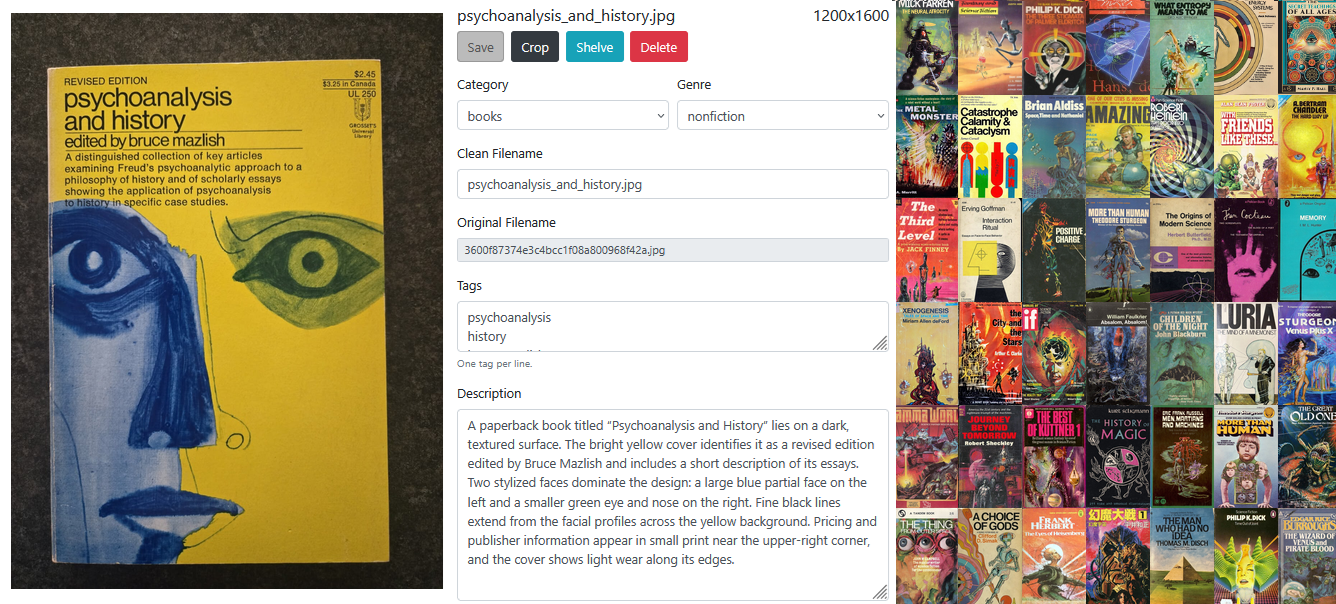
A command-line utility that uses vision models to organize images.
Features
-
Extract image metadata using a vision model, including categories, genres, tags, and image descriptions.
-
Rename arbitrary image filenames to clean, human-readable filenames.
-
Normalize uploaded image formats by correcting mismatched extensions and converting lossless or uncompressed formats to PNG and lossy formats to JPEG.
-
Detect and remove duplicate images using CLIP similarity and optional vision-model adjudication.
-
Automatically correct perspective distortion using computer vision and vision models.
-
Review and manually edit inferred metadata, filenames, crops, and perspective transforms in an interactive web app.
-
Prepare a static HTML gallery of images and metadata.
-
Generate a searchable image wall with a full-size image viewer.
-
Organize tagged images into configurable directories.
CLI Usage
You will need to put your OpenAI API key in the usual OPENAI_API_KEY
environment variable.
To preprocess, tag, and do human-in-the-loop review of new images, do:
image-tagger convert [DIRECTORY]  # normalize image extensions and metadata
image-tagger tag [DIRECTORY]      # Have a VLM infer tags, categories, clean filenames, etc.
image-tagger sfw [DIRECTORY]      # Classify images as SFW or NSFW
image-tagger rename [DIRECTORY]   # renamed image files to VLM-inferred filenames
image-tagger quad [DIRECTORY]     # fill in missing perspective-corner metadata for tagged images
image-tagger review [DIRECTORY]   # open interactive HTMX review app
Or run this command to do all six in sequence:
image-tagger run [DIRECTORY] [OPTIONS]
image-tagger run passes its directory and options shared by the workflow commands to
convert, tag, rename, quad, sfw, and review, in that order; for example, use image-tagger run uploads -vv
for detailed output throughout the workflow.
Next, you can run these individually as needed:
image-tagger clip [DIRECTORY]     # automatically detect and fix perspective skew
image-tagger shelve [DIRECTORY]   # distribute files across configured directories
image-tagger dedupe [DIRECTORY]   # identify and automatically remove duplicates
image-tagger wall [DIRECTORY]     # generate a mood-board-style image wall
image-tagger gallery [DIRECTORY]  # show images and details side-by-side
image-tagger thumbnail [DIRECTORY] DESTINATION  # create a publishable collection copy
image-tagger report [DIRECTORY]   # summary statistics and problems
image-tagger prune [DIRECTORY]    # clean up meta data
For detailed CLI instructions, run image-tagger --help, then use
subcommand help to see the
full list of CLI arguments and options for a given command:
image-tagger COMMAND --help
Command Details
image-tagger convert prepares uploads for tagging. It corrects image extensions when
the file contents do not match the name, converts lossless or uncompressed
formats such as BMP and GIF to PNG, converts lossy formats such as WEBP, AVIF,
and HEIC to JPEG, and normalizes .jpeg filenames to .jpg.
Pass -w or --welcome-extensions with a comma-delimited list to replace the
default welcome formats, such as image-tagger convert uploads -w jpg to convert every
other supported format to JPEG.
Every command uses a .stackmap configuration file. The CLI searches upward
from the directory where it was run, then falls back to ~/.stackmap; pass
--stackmap PATH to use a specific file. Shelf names are identifiers, and
paths may be absolute or relative to the .stackmap file itself:
default: shelves/inbox
art: shelves/art # paintings, drawings, and other visual art
books: shelves/books
An inline comment after a shelf path is passed to the tagging prompt as guidance for that category; it does not change the shelf identifier or path.
If DIRECTORY is omitted, tools use the default shelf. The default shelf
is an inbox and never a tagging category; every other shelf name is the
authoritative category list passed to the vision model. Metadata is written to
image_metadata.csv inside the selected directory.
Every DIRECTORY argument also accepts a shelf alias. Aliases take precedence
over same-named local directories, while unknown names remain local relative
paths. For example, image-tagger dedupe books uses the configured books shelf, and
image-tagger dedupe ghosts uses ./ghosts when ghosts is not configured.
image-tagger tag applies a vision language model (VLM) to tag and categorize images
in a structured dataset. It also determines a clean filename for each image
according to internal naming conventions. Multiple model providers are supported
(Download example CSV).
image-tagger sfw classifies every discovered image as SFW or NSFW using OpenAI
moderation by default. It populates nsfw_score in the metadata CSV.
image-tagger quad calculates missing quad values for existing images with successful
tag metadata. It skips rows whose files are missing or whose quad value is
already populated.
image-tagger clip automatically applies a perspective transform to orthorectify (unskew) images.
It determines the correct transform using a combination of traditional computer vision
techniques (Hough transforms and largest-quadrilateral contour detection) and a VLM
(example).
image-tagger review pulls up an interactive HTMX app to review and correct the
inferred tags and filenames. The review tool also allows you to shelve or delete
images during the review process. Below the dimensions, it shows NSFW scores
strictly above 10% as rounded whole percentages (for example, NSFW 22%), with a
yellow highlight strictly above 20%. Missing or blank scores show no badge.
Both review and run accept --nsfw-show-threshold (default 0.1) and
--nsfw-highlight-threshold (default 0.2); thresholds are probabilities from
0 to 1, checked before rounding.
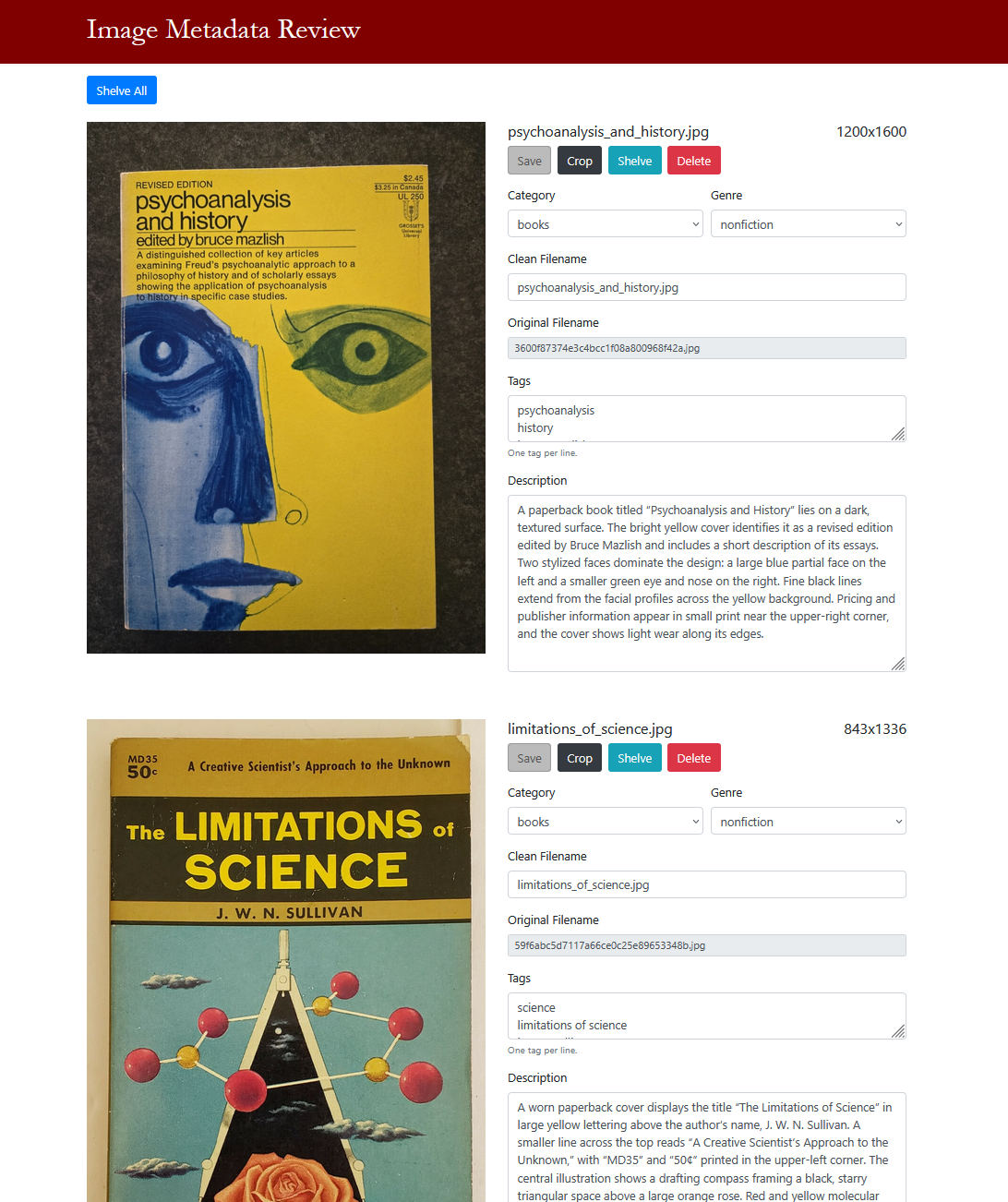
It also provides an interactive crop tool that can crop, resize, and either automatically or manually apply perspective transforms to images.
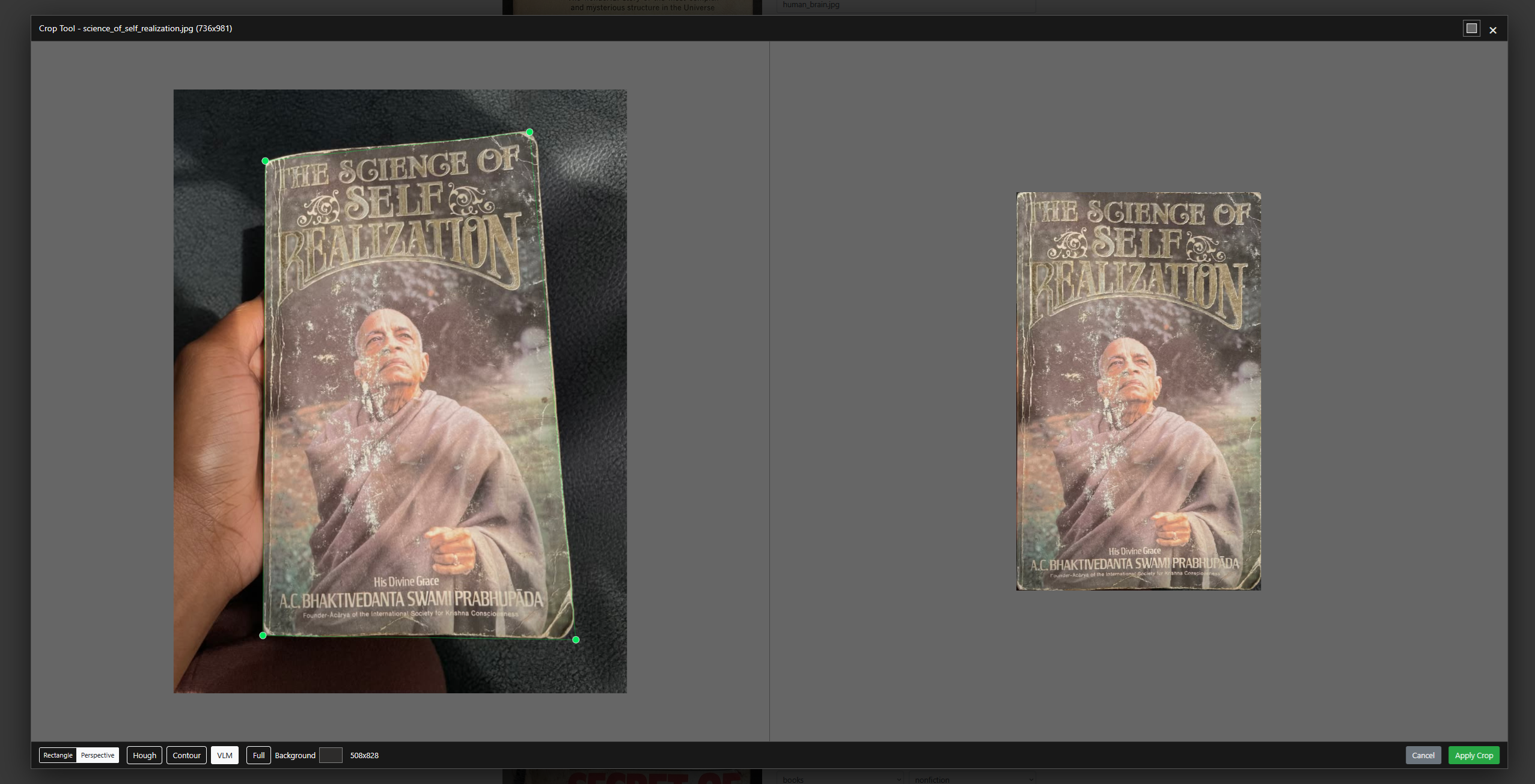
image-tagger shelve moves images into separate directories based on their inferred
(and human-reviewed) categories.
image-tagger dedupe removes duplicate images under DIRECTORY. CLIP scores at or
above --automatic-threshold are removed automatically; scores at or above
--llm-threshold are confirmed by the selected vision model before removal.
It maintains a cache of already compared images to avoid doing the full $O(n^2)$
comparison each time
(example).
image-tagger wall creates an index.html image wall directly from every supported image
under DIRECTORY. It uses relative image paths, computes a median image aspect
ratio up front, and displays the images in equal-sized grid cells with a
click-to-open full-size overlay
(example).
Experimental: use --order grid with wall to arrange the wall by CLIP similarity.
This attempts to put semantically related images close together. Whether this results
in more or less interesting image walls is debatable, but clusters are apparent in
the output.
image-tagger thumbnail copies a directory of images and their metadata to a new
directory, converting each image into a smaller thumbnail.
image-tagger gallery produces a static HTML version of the review tool showing the
image and its inferred metadata side-by-side
(example).
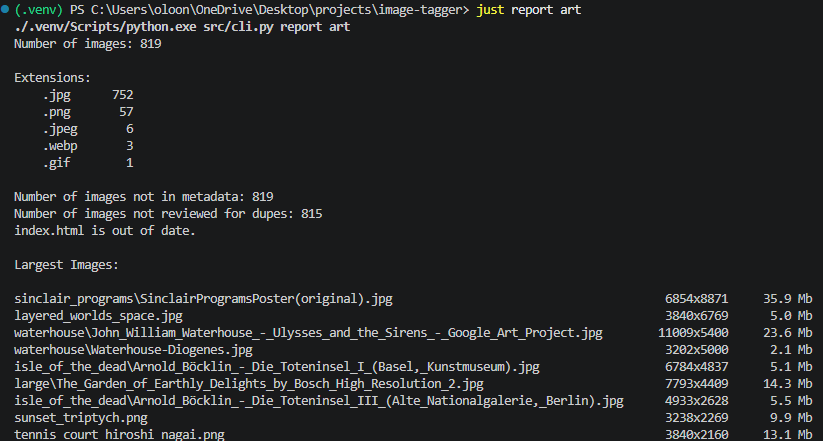
image-tagger report prints image totals, metadata breakdowns, outstanding metadata and
dedupe work, filename cleanup gaps, and the largest images in DIRECTORY.
It shows images larger than 1 MB by default; use --large-image-threshold with
values such as 500k or 2 MB to change that limit.
Vision Models
Supported vision model providers are:
| Code | Provider | Model |
|---|---|---|
openai |
OpenAI | gpt-5.6-sol |
gemma |
Ollama | gemma4:e4b |
qwen |
Ollama | qwen3.5:4b |
Python API
You can also generate an image_metadata.csv file for a given directory of
images from Python like so:
from image_tagger.tagging import find_images, tag_images

filepaths = find_images(image_dir)
tag_images(filepaths, metadata_filename)
This file contains descriptions, tags, and other metadata that a vision model can infer from the images.
The metadata CSV contains a column called clean_filename which suggests
a new, clean filename for each file in the format lower_snake_case.png.
To automatically rename all the images listed in the CSV to their suggested
clean filenames, you can use:
from image_tagger.shelve import rename_images

rename_images(metadata_filename, verbose=1, dry_run=False)
Finally, with a StackMap loaded from your .stackmap, run:
from image_tagger.gallery import generate_gallery

generate_gallery(metadata_filename, gallery_filename)
to generate a static index.html file which shows each image listed in
image_metadata.csv side-by-side with its inferred metadata. The gallery also has a
simple local search feature to demonstrate how the inferred metadata enables
better image searching.
To move renamed images into sibling directories matching the tagged category,
such as ../books/, create those directories first and run:
from image_tagger.shelve import shelve_images

shelve_images(metadata_filename, stackmap=stackmap, verbose=1, dry_run=False)
Source
The package uses focused modules by workflow area, plus a smaller
scramble.py module for scramble and image-copy helpers:
tagging.py: vision tagging, metadata schema, and CSV updates.dedupe.py: duplicate-review workflow and removal report generation.gallery.py: static metadata gallery rendering.wall.py: layout inference and image-wall rendering.compare.py: CLIP embeddings, similarity, and duplicate matching.report.py: collection summaries and consistency checks.vision.py: model-provider adapters and response wrappers.transform.py: CV plus VLM perspective-correction workflow.scramble.py: filename scrambling and copy helpers.shelve.py: metadata-driven rename, prune, and shelving actions.
The default vision-model instructions live in
image_tagger/data/image_prompt.md
and are loaded as IMAGE_PROMPT_TEMPLATE from tagging.py. Pass
--instructions-filename on the CLI, or instructions_filename from Python,
to use a different prompt template without editing package data.
The csv_columns variable (alias of CSV_COLUMNS in constants.py) contains
the names and order of the columns in the generated image_metadata.csv file.